A 16oz label is not an artwork template
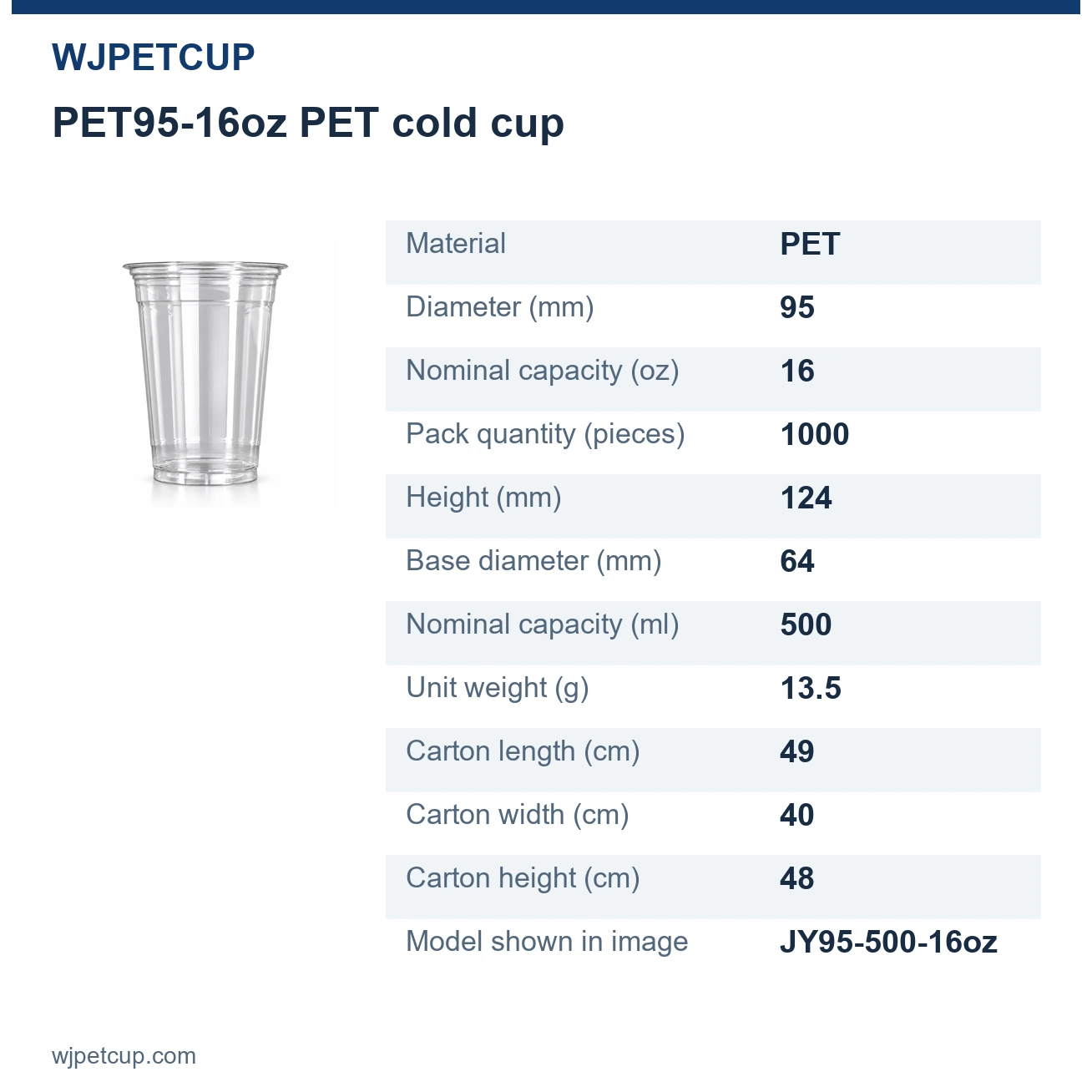
WJPETCUP lists several 16oz PET cups, including JY95-500-16oz and JY9806-500-16oz. They belong to different rim-size series and are separate models. The same capacity description therefore cannot be used as the identifier on a print order. Write the complete model on the brief and keep the corresponding product link with the artwork.
Consider a logo positioned below the rim. If the cup body or rim changes, a position approved against the old outline no longer describes the new object reliably. A design may also need to leave room around changes in the cup's shape. Ask for the printing layout applicable to the selected model and proposed process before treating a mockup as production-ready. Do not infer the printable height from the cup's total height.
This distinction lets the designer keep working without pretending that a production boundary is known. Prepare the logo, wording and visual priorities first; leave the final placement pending until the applicable layout has been established. If the model changes, reopen placement approval even when the drink-size name stays the same.
Describe placement in a way that can be checked
“Make the logo bigger” leaves two questions unanswered: bigger than which version, and measured along which part of the design? Give the file revision, the dimension being discussed and the reference point. Keep a labelled preview with the editable artwork so that the intended result remains understandable when the file is opened by someone else.
For a design with a front logo and a message on the opposite side, identify the front view and the intended relationship between those two elements. Mark which text must stay together. If the design includes a QR code, record its intended destination and reserve an approval step for reading the code on a physical sample; an image on a flat screen does not answer that question.
The following is a brief structure, not a completed order or a printing specification. Values still awaiting agreement should stay visibly unresolved instead of being filled with plausible-looking dimensions.
| Field | What to record | Why it matters |
|---|---|---|
| Cup identity | Exact model and product link | Prevents a shared size name from selecting a different cup |
| Artwork identity | One file name and revision, for example v03 | Connects feedback to the correct design |
| Position | Reference view and agreed placement measurements | Replaces vague instructions such as slightly lower |
| Colour appearance | Agreed colour reference and intended drink background | Makes the intended visual result explicit |
| Functional graphics | QR destination and text that must remain readable | Separates visual approval from functional checks |
| Open decisions | Items awaiting the applicable printing layout or sample | Avoids treating an unanswered question as approval |
Send the design assets and the viewing context
A screenshot is useful for showing intent, but it can leave the recipient without the objects, linked images or fonts needed to work on the design. Keep an editable master and a preview that shows how it should look. Adobe's Illustrator documentation describes packaging a document with linked graphics and supported fonts; its font-copying option excludes Chinese, Japanese and Korean fonts. Check permissions before sharing fonts, and agree the accepted production file format with WJPETCUP rather than assuming that every editable format can be used.
For a transparent cup, the intended drink is part of the viewing background. Where the colour ink is translucent, light from behind the print can affect its appearance; the same design may therefore look different over a dark drink and a light drink. A white-paper proof cannot show every such combination. This does not mean that every ink or PET-cup printing process behaves identically.
Distinguish three intentions in the artwork: an unprinted area that stays transparent, a visible white graphic, and a white backing behind another colour. They are not interchangeable. Where the chosen process supports a white backing, it can reduce background show-through, but it also makes that area less transparent. State which areas should remain clear and which should appear opaque; do not assume that a white area on a screen will automatically be printed in white. Roland DG explains this distinction for its digital graphic-printing systems; it does not establish which process WJPETCUP uses.
Keep the desired appearance separate from production capability. White printing or a white backing, colour count, print area and printing method must be confirmed for the selected cup and artwork. A CMYK file alone does not establish how the cup will be printed. If white is proposed, ask how it is counted and priced for that order; this guide does not set a universal colour-count rule.
| Design requirement | Make the choice explicit | What the proposed sample should answer |
|---|---|---|
| White and transparent areas | Mark transparent gaps, visible white graphics and any requested white backing separately. | Does the proposed arrangement preserve the intended clear areas and make the required details readable against the intended drink? |
| Photographs, gradients and shadows | Identify essential effects and whether a simpler version is acceptable. Check feasibility before approving the final file. | Does the agreed method reproduce the essential detail acceptably on the chosen cup? Do not assume either full reproduction or mandatory simplification. |
| An existing brand-colour reference | Identify the colour code or physical reference and its material, such as paper or another cup. Prioritise the colours that matter most. | Has the appearance been reviewed on this PET cup in the agreed context? The reference itself is not approval of a different material or printed sample. |
Approve the file and the physical appearance separately
Use a digital proof to check spelling, artwork revision, orientation and the placement shown in that proof. Use a printed sample to review the appearance on the actual cup under the intended viewing conditions. These are different decisions: approval of a name's spelling should not silently become approval of an unexamined printed colour or QR code.
For a practical comparison, keep the cup model, artwork revision, viewing side, lighting and surrounding background the same, then change only the drink being compared. Record the drink and fill level, and look at the same logo area in each condition. If the design must serve both dark coffee and a pale drink, review both rather than selecting only the more flattering result. This is a suggested buyer review method, not a WJPETCUP test result or a colour-tolerance standard. Nazdar’s colour-matching guidance treats substrate colour, viewing light and required opacity as separate inputs; applying that principle to a cup helps make feedback reproducible.
A useful change note reads like this: “Revision v03: wording approved; logo position awaiting the model-specific layout; physical colour appearance not yet reviewed.” This is an illustrative note, not a WJPETCUP test result. It gives each participant a clear next action without making the whole design either ambiguously approved or permanently unfinished.
When a sample leads to a correction, save a new revision and state which checks must be repeated. A wording-only change and a change to the cup model affect different parts of the earlier approval. Keep the agreed file, sample reference and dated decision together so that a later bulk order or repeat order refers to a defined version.
Turn the brief into a practical sampling request
Send the exact model, the editable design and preview, the quantity planned for that model, the appearance to assess, and the delivery destination. State what is ready and what remains open. This lets the conversation resolve a specific layout or sample question instead of restarting with a generic request for printed cups.
WJPETCUP's confirmed printed-sample period is 7–10 calendar days after both final artwork confirmation and receipt of the sample payment. Preparing a clear file does not itself start that period. The separate scheduling guide explains the start conditions and how sampling, bulk production and transport fit together; the sample-record guide covers the later physical review.
Read more
Prepare a brief for your selected PET cup
Send the complete cup model, current artwork revision and the appearance you want to check. Mark any undecided placement or colour requirement so it can be resolved before final artwork approval.